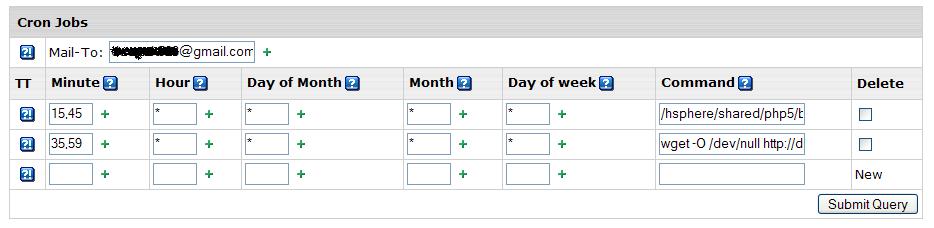
I’m sure Praveen’s answer is the best way but of course its only useful for hitting a site on the same account. I’m using a cron on a Linux account to hit a page on a Windows account where we don’t have cron.
The -O to null throws away the output rather than saving a file each time. I think your permissions issue is related to the log (-o). Assuming that you really want to the log, you might have to create it manually and set permissions so that the cron user can write to it. That’s just a guess.
I didn’t want the email but couldn’t avoid it so I sent it to a mailbox which discards incoming messages.
Result: I did not receive an e-mail with error message. At the same neither job actually worked. I can tell that by looking at the time on my website when the last time cron.php was accessed.
This threw an error because cron.php included some files using the statement “include_once ./includes/database.php”. PHP resolved “.” to /hsphere/shared/php5/bin/ which of course was not correct.
After scratching my head for a while, I created a file called cron_hsphere.php and put following lines in it:
<?php

//Simple way to read the contents of a cgi-script.

$file = 'http://mydomain.com/cron.php';

$result = file ($file);

?>
I scheduled the following command:
/hsphere/shared/php5/bin/php-cli /hsphere/local/home///cron_hsphere.php