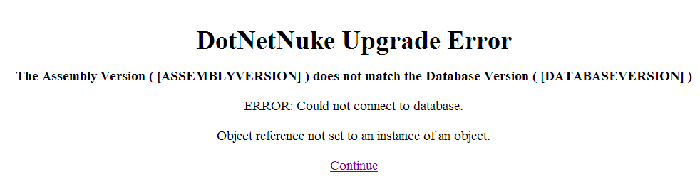
I thought I had gotten the glitches worked out the other day and finally had DNN installed properly on Jodo shared server.
Nooooooooo…
It runs, but only when I use Access as the database. Can anyone tell me what’s wrong with my DNN install. Following is my connection data in the “web.config”…
[FONT=Courier New]
[/FONT]
I don’t see anything wrong with it. An image of th error screen when I try to run DNN is attached.
@Silverstone
Are you using DNN? If so, are you using MS SQL Server as your dbase? If so, does your dbase and/or user name contain an underscore ( _ ) ?
Thanks for the tip, I’ll try this evening,
@Yash
I submitted a ticket last night. I gotta have DNN running. I hope they can help figure this out. I’ve tried everything.
[QUOTE=mdeibert] @Silverstone
Are you using DNN? If so, are you using MS SQL Server as your dbase? If so, does your dbase and/or user name contain an underscore ( _ ) ?
[/QUOTE]
Has support create your sub folder as an application directory? Is asp.net enabled on your domain? Did you ask for DBO permissions on your database before going for an install?
[QUOTE=Yash]
We have quite a few customers that have setup DNN
Has support create your sub folder as an application directory? Is asp.net enabled on your domain? Did you ask for DBO permissions on your database before going for an install?
[/QUOTE]
I have not been able to get DNN to run in a sub folder. I -can- make it run in my root web if I want MS Access as the database. I don’t want Access. Obviously
I got full read and write permission for “ASPNET” and “NetworkService” accounts in my root web. That’s not the prob. Unless some sub folder didn’t inherit the parent permissions. Can you check that?
My standard login “mdeiber_admin” -is- the DBO in my database so that’s not the problem.
Above you mention there are DNN installs hosted here at Jodo. Are they DNN2.0 versions or the 1.0 versions? If 2.0, are they using MSSQL Server as the database? The DNN default installion uses MS Access dbase.
Thanks for the replies Yash. I hope you can figure something out. I’m stuck.
Can you verfify that every folder in my root web allows read and write for the ASPNET account? Is my site running on a Win2000 box or a Win2003 box? If Win2003, then the account “NetworkService” also needs full access to every folder. I think I’m on machine “Win6”. My site is d6wars.com.
Just t let you know, I have helped out a number of customers with minor DNN issues (mostly related to the authorization scheme) and they run really well, I do not know how they installed them, but they work fine to the MSSQL servers I am sure of that much.
How can you use localhost when there is no SQL server at localhost?
I am not sure if the servers being not on the same machine is why DNN is so hard to install or what. I guess I need to setup a DNN just to experience how hard it is.
The problem most people are having installing here is down to DNN not the host…
In the early db install files from 1.0.sql to 2.0.sql the dbo owner and the object qualifiers were hard coded, that is they either were not using them or were set to ‘dbo’, there is also a few problems in the 2.x file also where they forgot to use the correct qualifiers on the foriegn & primary keys.
So what happens is that the db creation fails if you are not installing as the dbo owner, even if your db user id is given full permissions it still fails. You need to be the ‘dbo’ account to get it to work.
What I did to install was to run the install on my local machine (using msde db), being on your local pc you will most likely be the dbo so you wont have problems. I then just uploaded the db with enterprise manager to my sql db on jodo. (as in the 2.x.sql upgrade scripts they fix most the table/field names you shouldnt have any problems)
I now dont have any problems using my db owner, if you are going to use an objectQualifier also you will need to fix the names of some of the FK_ & INDEX_ fields (i put a script on the asp.net forum somewhere).
The db permissions jodo set should be sufficient, but you might still need to be given dbo permissions for running upgrades. Everything after 2.4 should work if the {objectQualifier} & {databaseOwner} are correct. I havent upgraded to 2.1 yet but i did tell them about problem while back.
I guess the best way to fix this would be if there was a clean db script for installing dnn 2.x+, instead of running all the 1.x ones first.
[QUOTE=mdeibert]
I thought I had gotten the glitches worked out the other day and finally had DNN installed properly on Jodo shared server.
Nooooooooo…
It runs, but only when I use Access as the database. Can anyone tell me what’s wrong with my DNN install. Following is my connection data in the “web.config”…
[FONT=Courier New]
[/FONT]
I don’t see anything wrong with it. An image of th error screen when I try to run DNN is attached.
Any help will be GREATLY appreciated,
Mark
[/QUOTE]
I don’t know if you’ve solved this problem yet, but the answer is quite simple.
defaultProvider= must equal the name of a provider - AND MATCH CASE!
You have sqlDataProvider when it should be SqlDataProvider with a capital S.
The error just says it can’t find the provider you specified.