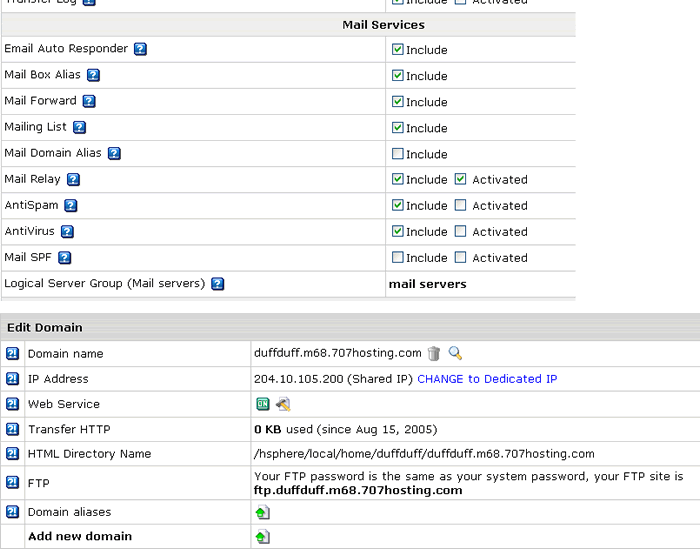
I just signed up for a reseller package and I’ve never used HSphere before so I’m not sure what I’m doing wrong… I created a new package and signed up for it to test it out. When I click the “Email” or “Webmail” icons under the test account, I get the message “Unfortunately, there are no available mail domains.” What do I need to do to get emails to work under that account? If you need anymore info to answer the question, let me know
I don’t see anything under the plan details that says “Mail Resources”. I’ve attached screen shots of the 2 areas you mentioned so that you can see how they are currently set up. Maybe I’m looking in the wrong spot ?(
[QUOTE=Underdog]
first, go over the plan details by clicking Edit, next to the plan. Make sure Mail Resources are enabled there.
second, enter your cp and click over your domain name (its hilighted in blue)
In this place you should see “Mail Resource”. Make sure it’s “On”.
Attached are the plans I have set up so far. Which one of these do I need to go into to get the Mail Domain turned on? Also, if you could tell me the icon to press since there are multiple that “edit” the account settings. Thanks for all your help – I’m not sure why I can’t figure this out.

 .
. More details than my quick quip.