Great, thanks.
Just ran the intoDNS check and am getting ERROR: One or more of your nameservers did not respond:
The ones that did not responded are:
XXX.X.X37.5 XXX.X.X38.5
Ideas?
did you assign ns1/2/3/4 all to ‘active’ nameservers on your domain? You should only have the two listed by your domain in the domain summary view of the control panel.
Otherwise you will have two not respond.
you can have as many host summary entries as you want there, but ONLY the two assigned to the domain should be used for your domain. You simply need the others in host summary to provide the ‘glue’ at the root servers for your nameserver lookups.
Re: Help with nameserver update
Sorry, Stephen, I see now that you had addressed this issue with Skypanther earlier, but somehow I missed that post. When you say “go to the domain in hsphere”, are you referring to the Hsphere account for the service domain? If so, I’m having trouble finding the summary referred to; please clarify.
Here’s a screenshot of the Go Daddy configuration for the service domain as it’s been since 2005:
http://angildesign.com/images/comp/dns.gif
If I understand correctly, there should only be two listings under name servers, correct? Just out of curiosity, what are the consequences of leaving it as-is?
Re: Help with nameserver update
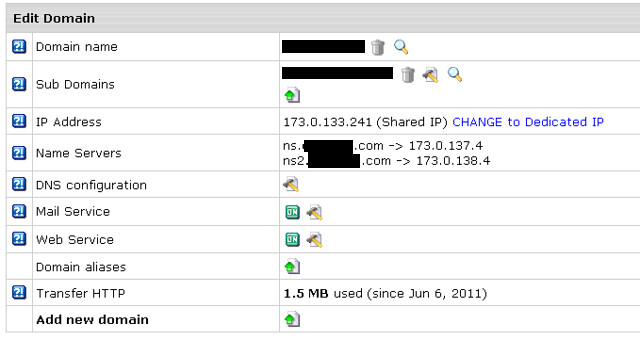
This view, will show the servers assigned on a per domain basis, this is my service domain, and it is on ns/ns2 servers.
Yes, under name servers just the two nameservers, make sure it is the two that show in the domain overview screen (click domains, then the magnifying glass next to the domain on Hsphere user CP)
What can happen? It won’t be the end of the world, but lookups may randomly fail as DNS works in a round robin manner and if 50% of queries fail it will do a fall back, if that one also fails it will give a ping down, domain not found, etc so you really only want responding nameservers there.
Thanks, Stephen! That clears things up nicely.
Hey Stephen,
I checked mine again (originally changed on 6/12/11) and it still has the message about the glue A records (See Below). Do I need to do something or is that on your end?
Thanks,
Greg
Domain NS records
Nameserver records returned by the parent servers are:
ns1.starcityhosting.net. [‘173.0.xxxx.xxx’] [TTL=172800]
ns2.starcityhosting.net. [‘173.0.xxx.xxx’] [TTL=172800]
m.gtld-servers.net was kind enough to give us that information.
TLD Parent Check
Good. m.gtld-servers.net, the parent server I interrogated, has information for your TLD. This is a good thing as there are some other domain extensions like “co.us” for example that are missing a direct check.
Your nameservers are listed
Good. The parent server m.gtld-servers.net has your nameservers listed. This is a must if you want to be found as anyone that does not know your DNS servers will first ask the parent nameservers.
DNS Parent sent Glue
Good. The parent nameserver sent GLUE, meaning he sent your nameservers as well as the IPs of your nameservers. Glue records are A records that are associated with NS records to provide “bootstrapping” information to the nameserver.(see RFC 1912 section 2.3)
Nameservers A records
Good. Every nameserver listed has A records. This is a must if you want to be found.
NS
NS records from your nameservers
NS records got from your nameservers listed at the parent NS are:
ns2.starcityhosting.net [‘173.0.xxx.xxx’] [TTL=86400]
ns1.starcityhosting.net [‘173.0.xxx.xxx’] [TTL=86400]
Recursive Queries
Good. Your nameservers (the ones reported by the parent server) do not report that they allow recursive queries for anyone.
Same Glue
The A records (the GLUE) got from the parent zone check are the same as the ones got from your nameservers. You have to make sure your parent server has the same NS records for your zone as you do according to the RFC. This tests only nameservers that are common at the parent and at your nameservers. If there are any missing or stealth nameservers you should see them below!
Glue for NS records
INFO: GLUE was not sent when I asked your nameservers for your NS records.This is ok but you should know that in this case an extra A record lookup is required in order to get the IPs of your NS records. The nameservers without glue are:
173.0.xxx.xxx
173.0.xxx.xxxx
You can fix this for example by adding A records to your nameservers for the zones listed above.
This might come up after some time as far as i can see in your Reseller Control Panel under EManager > DNS Manager > Action > View Zone Instant Alias you have all the required records [ The A records ]
So all is just fine.