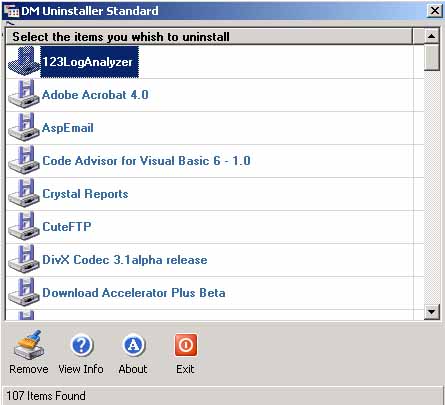
Please see the attached screenshot of a program that shows all the program
that are installed on windows (program is available on pscode.com). This program is an uninstaller that uninstalls program from the windows.
This program picks registry keys from the following location to show programs installed:
Now the problem is as you can see it is showing same icon for every program installed. What I want is to load
the respective icon for each program like you see in Add/Remove Programs in Control Panel.
In the above path key you will find a string called DisplayIcon which shows the icon to be displayed but not all
keys (programs) have this string.
Once you have the Icon, you’ll have to dynamically load it into your ImageList box. I don’t know if this is possible but its something you could explore
I used to do some VB coding and have worked with Assembly as well but now I’m tired of it
Once you have the Icon, you’ll have to dynamically load it into your ImageList box. I don’t know if this is possible but its something you could explore
I used to do some VB coding and have worked with Assembly as well but now I’m tired of it
[/QUOTE]
Thanks for your quick reply Yash but this program uses a List box with image list so I have to give physical path of the images which could a gif, jpeg or bmp e.t.c
The solution you have provided is my last resort and I will definitely use it but still it is not easy to find the EXE of all the programs installed because the registry key I provided above doesn’t contain the EXE path of all the programs. But I really appreciate your comments and will see the link you have given.