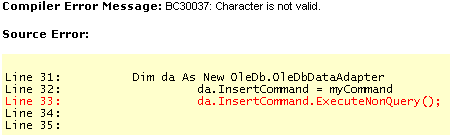
Hi. First off I am new to .NET… I have a MS Access database with one table, called “client_profile” that table has the following fields… “profile_ID” = autonumber the rest are text… “Company_Name”, “Contact_Name”, “Address”, “City”, “State”, “Zip”, “Phone”, “Phone_2”, “Fax”, “Email”…I am using a simple form to accept user input for all fields except the autonumber ID. The page is producing no errors, however is not inserting the new record… If anyone can help to explain to me what I have done wrong, I would be eternally grateful. The following is the source…
Thank-you for replying… I inserted the code and received an error saying, "Missing semicolon ( at end of SQL statement. I added the semicolon and received the following message..
[QUOTE=Code Cleric]
Thank-you for replying… I inserted the code and received an error saying, "Missing semicolon ( at end of SQL statement. I added the semicolon and received the following message..
[/QUOTE]
The SQL statement needs to be terminated with a semicolon (not the vb code).
Change
clientemail.Text & “‘)’”
to
clientemail.Text & “‘’);”
Also note that the single qoute after the right parenthesis would cause an error too.
Riley thankyou very much… Your advice worked. The entries were inserted properly. I can’t thankyou enough. I am new to SQL commands and .NET… Again thank-you for helping me.
[QUOTE=Code Cleric]
Riley thankyou very much… Your advice worked. The entries were inserted properly. I can’t thankyou enough. I am new to SQL commands and .NET… Again thank-you for helping me.
[/QUOTE]
You’re welcome. It seems you’re doing pretty good; your code was very close to working.
As for SQL, I have found it very convenient to use the MS Access query builder tools. Once the query looks good, go to the SQL view and copy the code. You can then work that text into you vb code. I’ve been writing SQL for MS SQL databases for some time, but I don’t consider myself an expert. I have found that sometimes SQL for MS Access is a bit touchy by comparison. Using the query builder helps eliminate that problem.
I would also suggest that you incorporate some error handling in your code. In .Net, you would use Try Catch blocks. Here is an example where an error would be trapped and an error message would be displayed in a .Net Label control.
Catch ex As Exception
myMessage.Text = "Error inserting rows: " & ex.Message
myMessage.Visible = True
End Try
If your insert command works, the ClearForm() code will be called and the myMessage label will not be rendered. If there is an error inserting, the ClearForm() code will not be called and the myMessage lable will be rendered at the bottom of your form, containing a message describing the error.
 at end of SQL statement. I added the semicolon and received the following message..