Sick of your reseller CP starting on the Plans page?
3rd Dec 2008 - these instructions now reflect the current version of HSphere.
If you’re like me, and get annoyed with your reseller CP going straight to the “Plans” page instead of the Main Menu, we’re in luck! I found out how to change the default page!
Do the following:
Step 1:
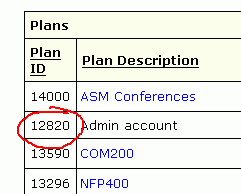
Log in to your reseller service CP. On your Plans page, find the plan called “System” or “Service”.
It should have the lowest number of all the plan IDs listed.
Click the Settings icon for that plan.
Step 2:
You should now be on the Plan Settings page.
Look at the URL in your browser and find the part that begins “?plan_id=xxxx&template_name=…etc.”
The number xxxx is the plan ID number of your System plan. Subtract one from that number and change it in the URL.
For example, if the URL was “?plan_id=1234&…” then change it to “?plan_id=1233&…”
Only change the number, leave the rest of the URL unchanged. Then hit Enter.
Step 3:
All being well, you should find yourself on the Settings page of the Admin Account.
If you see the words “null settings” then don’t go any further, this trick didn’t work for you.
In the Default Template box, you’ll see the setting design/info.html.
Change the Default Template to quick/quick_view.html then click the Change button.
That’s it! Now, every time you log in to your reseller CP, you will get the Main Menu instead of the stupid Plans page!
Great tweak. I think you can now also give out trouble ticket plans only without any access to the CP by changin default plan to “tt/new_tt_admin.html”.
Well, when you create a trouble ticket user, they get access to the user info and other stuff. By changing this to the template mentionned earlier I assume, it would be possible to login directly to the TT interface rather than going through the control panel.
Updated this tip for the latest version of HSphere, which now doesn’t show you the Admin plan on the Plans page. But it seems the Admin plan is the lowest plan ID in the list minus one.
It’s worked for me on 2 reseller plans, one in Cluster1 and the other in Cluster2 so should be ok to try.